A lost phone is stressful enough. Knowing where your wallet backup is gives you a place to start.
Cadmos gives you two things to save: your original seed and an encrypted backup. You can also use a separate recovery tool if the Cadmos app is unavailable. Take a few minutes to prepare while your phone still works.
Your seed is 12 secret words
Self-custody means you control the key used to approve wallet transactions. Your phone creates that key and a seed: 12 secret words that let you recover it.
Anyone who has those words can recreate your key too. Your app PIN or password cannot protect a seed someone has already copied.
Keep the words private, and keep them in the right order. They are what you need to restore your key if you lose your phone.
Find your backups in Settings
Open Settings and scroll to Security:
| What you need | Where to find it |
|---|---|
| Original seed: 12 words | Settings → Security → Display Seed |
| Encrypted backup | Settings → Security → Display Recovery Phrase |
For Display Seed, read the warning and confirm your identity with your fingerprint, face, or PIN. Write down all 12 words privately and check their order.
For Display Recovery Phrase, confirm your identity, then use the cloud backup button or copy the encrypted text to your own private storage. You need an internet connection for this screen.
The names can be confusing: Seed shows the original words. Recovery Phrase shows the encrypted copy. The app handles the separate key needed to read that copy; you do not need to find it in Settings.
Never share your seed
Never share your 12 words with anyone, including Cadmos support. Do not send them in a message, read them out on a call, or show them during screen sharing. Anyone asking for them to “verify” or “repair” your wallet is asking for access to your money.
To keep your seed safe:
- Write it down carefully. Number the words and check them against the app.
- Keep it away from your phone. A paper copy in a locked, dry place is a practical option. Consider theft, fire, and water damage. Protect any second copy just as carefully.
- Avoid screenshots and unencrypted notes. Do not put the words in email, chat, or your photo library. Photos may upload automatically to the cloud.
- Enter the words only when restoring a wallet. Use an official wallet app on a device you trust. Never paste your seed into a recovery website.
Ethereum's wallet safety advice also warns against sharing seeds or photographing them. If someone may have seen yours, contact official Cadmos support promptly. Explain what happened without sending the words. Changing your app password will not make the copied seed safe.
An encrypted backup you can keep within reach
An encrypted backup is your seed saved as unreadable text. A separate decryption key is needed to turn it back into the original words.
Your phone creates the backup and its key. It sends the key to Cadmos for safekeeping. Your seed and the encrypted copy are not sent to Cadmos's servers.
Cadmos cannot read your seed. It holds the separate key; your encrypted backup stays in your own storage. When you restore it, your phone asks Cadmos for the key and reads the backup on your phone.
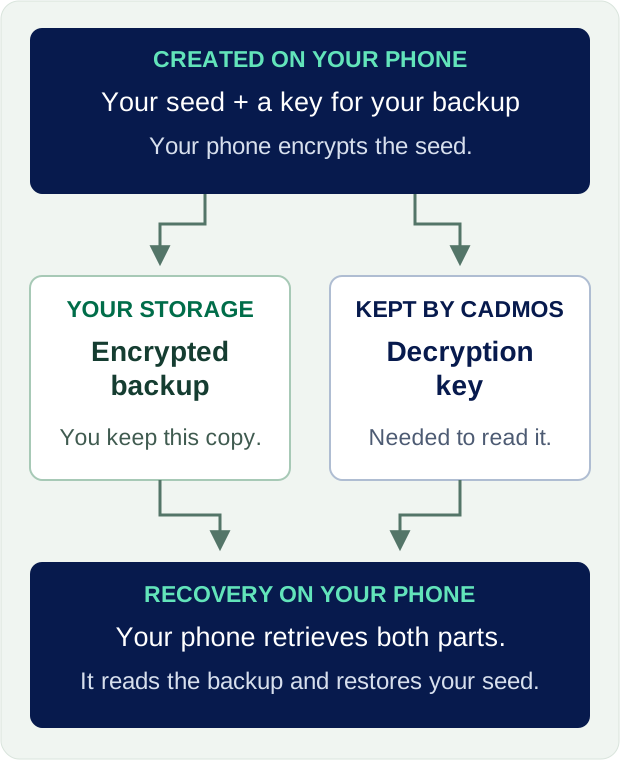
This encrypted copy is meant for convenient, everyday storage, such as your private Google Drive or the app's iCloud backup option. Keep the original 12 words safely offline, and use the encrypted copy as an extra backup you can reach more easily.
Check that the app confirms the save. Protect your cloud account with a unique password and two-step verification. Avoid public links or shared folders, and never send your backup to support. Anyone who gets both the encrypted copy and its decryption key can recover the words.
Make sure you can access that cloud account from another device, even if your phone is gone.
Getting back into the app
On a trusted replacement phone, open the official Cadmos app and follow its recovery steps.
If you have your Seed, enter the 12 words in order. Your phone restores the key and checks that it belongs to your Cadmos wallet.
If you have your Recovery Phrase:
- Retrieve the encrypted copy from your cloud backup or enter the encrypted text you saved.
- The app asks Cadmos for the separate decryption key after checking your account access.
- Your phone uses that key to read the backup and restore access. Your seed stays on the phone.
This option needs Cadmos's recovery service to be available. Keeping the original seed gives you a way to restore your key without that service.
Before wiping or trading in an old phone, check that your wallet works on its replacement. If you lose both backups, contact support: some accounts have an assisted recovery option, subject to identity checks and a waiting period.
Recover your funds without the Cadmos app
Cadmos has a separate emergency recovery tool for times when its app or services are unavailable. With your wallet key, you can use it to move supported funds without logging in to Cadmos.
The tool can recover supported tokens held in your Cadmos wallet and supported balances in Cadmos vaults. It sends them to the wallet you connect. You check and approve the transfers yourself.
There are two addresses to know. Your Cadmos wallet address is where your funds are held. A separate wallet holds the key that approves transfers; the tool calls this your signatory wallet. Restoring your seed in another wallet app brings back this key, but may not show your Cadmos balance there. The recovery tool connects the two.
When you need it:
- Prepare a compatible wallet. It must hold the key that controls your Cadmos wallet. If you need to restore it from your seed, enter the words inside that wallet app. Never enter them on the recovery webpage.
- Choose Arbitrum One. This is the network used by the tool. Keep enough ETH in the wallet you connect to pay the network fees.
- Open recovery.cadmos.dev. Check the website address, choose Connect signatory wallet, and enter your Cadmos wallet address in the Cadmos Smart Account field.
- Choose Scan & Build Plan. Read the list of funds to recover and check where they will go. The destination is the wallet you connected. If something looks wrong or is missing, stop and check before approving.
- Choose Recover Now. Review each request in your connected wallet and approve the intended transfers. Check the results and the money received. If a step fails, stop and run Scan & Build Plan again before retrying.
The recovery webpage never asks for your seed or private key. It needs you to control your existing key, a working connection to the blockchain, and enough ETH for fees. It cannot recover a lost seed, read your encrypted backup, or undo a transfer that has already happened.
Keep a copy of the recovery tool
The tool's code and instructions are public in the Cadmos-Pay-Recovery project on GitHub. Anyone can inspect the code and download a copy.
If the recovery website is also unavailable, you can run a copy on your own computer. The project includes setup instructions and the code that handles the recovery transactions. This takes more technical knowledge than using the website. Someone you trust can help you set it up while you keep your seed private and approve transfers yourself.
Bookmark both the recovery website and the GitHub project. Save your Cadmos wallet address with those links. Never put your seed in a GitHub comment, a support request, or a file you share for troubleshooting.
Do this before you need it
Open Settings → Security. Write down your seed, save your encrypted backup, and check that you can find both. Keep your wallet address and the recovery links somewhere you can access without your phone.
A backup is useful when you can find it. Give yours a safe place today.
Recovery tool version checked on 10 September 2026: v1.0.0. The exact code reference, called a Git commit, is 47906330a474368866e4cde35ff0c7bda7f7ea15.